.png)
.jpg)
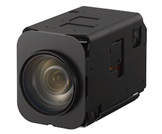
The Sony FCB camera series is high-performance block camera widely used in industrial, security, medical, broadcasting, and UAV applications. Known for their compact form factor and exceptional image quality, FCB cameras integrate Sony’s advanced optical zoom lenses, Exmor/Starvis sensors, and powerful image-processing engines. The series offers features such as low-light sensitivity, image stabilization, wide dynamic range, and flexible zoom options, making them easy to embed into custom systems. Overall, FCB cameras are valued for their reliability, versatility, and professional-grade imaging in demanding environments.
Most Sony FCB “block cameras” output raw LVDS or other digital video internally, not a standard HDMI/SDI/USB video that you can plug directly into a monitor, recorder, PC, etc. An interface board converts that raw output into a usable format (HD-SDI, HDMI, USB, Ethernet, etc.), provides power, and often gives a control interface (e.g. serial/VISCA, USB) so you can control zoom/iris, etc. Without a board, the camera is almost useless for most real-world applications beyond “raw module on a bench” use. Hence a “total solution” = camera + correct interface board + cabling/power + control interface.
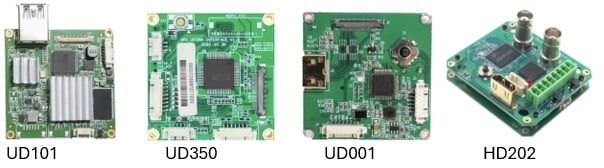
Below is a practical, model-grouped overview of the interfaces used by Sony FCB block cameras and the type of interface board typically required to integrate them. In Sunnic, we can pair up suitable interface board to correct FCB cameras to facilitate the design of the system using third party interface board. (Exact requirements vary by system design, but these are the standard norms across the FCB series.)
| Camera Models |
Output Interface |
UD101↓ (USB 3.0 output) |
HD202↓ (SDI output) |
UD111↓ (HDMI output) |
UD350↓ (IP output) |
UD001↓ (HDMI 4K output) |
HD101↓ (HDMI FHD output) |
|---|---|---|---|---|---|---|---|
| FCB-EW9500H | 4M, HDMI | * | |||||
| FCB-EV9500M | FHD, MIPI | * | |||||
| FCB-EV9520L | FHD, LVDS | * | * | * | * | ||
| FCB-ER8530 | 4K, LVDS | * |
Points to take note of when selecting the suitable interface board.
- Always match the camera series (FCB-EV / FCB-EH / 4K / etc) with a compatible interface board as not all boards support every FCB variant. Interface boards specify compatible camera series.
- Check output format requirement (SDI, HDMI, USB, IP) depending on the final use (monitor, capture card, streaming, etc.).
- Ensure the board provides power + control interface (VISCA / RS-232 / serial / USB / Ethernet) otherwise, the camera may not be able to zoom, pan, change iris, etc.
- Mind the cabling / connectors: many boards use proprietary 30-pin / LVDS connectors; correct cable for the camera to the board is needed.
Common Mistakes to Avoid
- Assuming “one-size-fits-all”: Not all interface boards support all FCB camera models and when there is a mismatch, it will cause errors or no output.
- Not verifying power requirements: Some cameras draw more current than a default USB port can supply that leads to instability or failure to retrieve the output.
- Overlooking control interface: Without VISCA/serial support, one may end up with passive video only and no zoom/focus control.
- Ignoring output format compatibility: e.g. using HDMI when SDI is needed or using an SDI board but the infrastructure only accepts HDMI.
- Underestimating operating environment: If used in a constrained or industrial environment (heat, vibration, drone use), board spec of temperature, EMI shielding, cabling become important.
Contact Information:
Should you have any enquiries, please feel free to contact us at the address below.
1: Chua Ren Tsong (For SEA enquiry)
Sunnic Technology-Indo-Pacific (S) Pte Ltd
Mail ID: rentsong_chua@sunnic.com.sg
Hand phone number: +65 8368 7149
2: Senthil Kumar (For India enquiry)
Sunnic Technology-Indo-Pacific (I) Pvt Ltd
Mail ID: senthil_kumar@sunnic.com.sg
Mobile Number: +91 85080 24918
